1 Introduction: Why Do We Need Material Designer?
Simulating structural components made from advanced engineered materials such as fibre-reinforced composites, woven fabrics, metals with cellular lattices, porous meta-materials, etc. presents a multi-scale challenge. Performing a full FEA down to the individual microscopic fibre or strut level for an entire macro-scale part is practically impossible. For instance, in a wind turbine blade spanning over 100 meters, individual glass fibres have diameters of just a few micrometres, resulting in a scale difference of nearly eight orders of magnitude. Performing a direct FEA that meshes every microscopic fibre, strut, or particle across an entire component would require billions of elements. On the other hand, relying solely on physical experimental testing to determine macro-scale anisotropic material properties is expensive, slow, and limits early design iteration.
Ansys Material Designer bridges this multi-scale gap by enabling virtual material testing and homogenization. Integrated directly into Ansys Workbench through the SpaceClaim Direct Modeler interface, Material Designer calculates the effective macroscopic properties of a complex material from the known properties of its individual constituent phases (such as fibre and matrix, or metal and void).
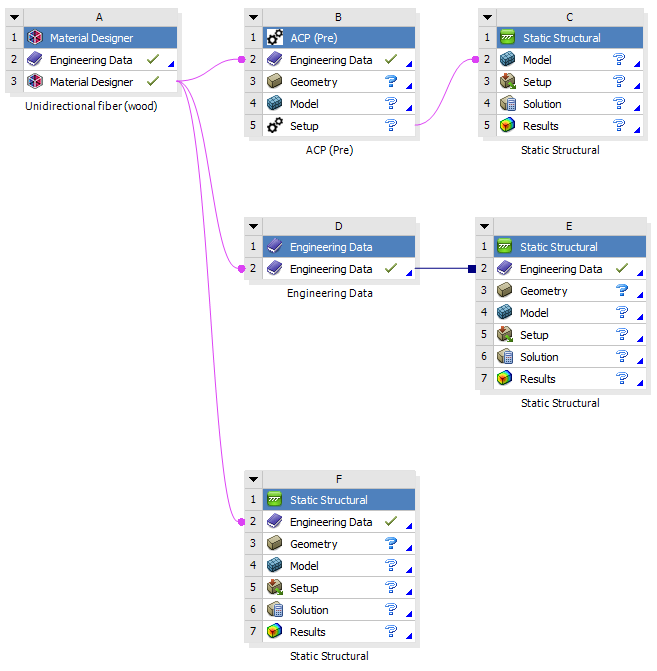
Figure 1. Workbench Schematic Overview: Users can export the Material Designer results downstream to the Engineering Cells of subsequent systems for further simulation, such as feeding the results to ACP (Pre) for lay-up design, or stress-testing designs in Ansys Mechanical.
2 Core Concepts: RVE and Virtual Homogenization
2.1 Representative Volume Element (RVE)
The foundation of Material Designer is the Representative Volume Element (RVE). An RVE is a small volume of the material that is still large enough to exhibit the correct macroscopic material properties. For periodic microstructures, the RVE corresponds to a single unit cell repeating in all three spatial directions.

Figure 2. Model types in Material Designer.
2.2 Virtual Load Cases and Homogenization
To derive homogenized engineering constants, Material Designer subjects the meshed RVE to six macroscopic virtual load cases (three tensile strain states along X, Y, Z, and three pure shear strain states in XY, XZ, YZ.
By analysing the volume-averaged stress response of the RVE under these boundary conditions, Material Designer automatically calculates:
- Orthotropic / Anisotropic Engineering Constants: E1, E2, E3 (Young’s Moduli), G12, G23, G31 (Shear Moduli), and nu12, nu13, nu23 (Poisson’s Ratios).
- Mass Density: Homogenized density derived from constituent volume or weight fractions.
- Thermal Expansion & Conductivity: Orthotropic secant Coefficients of Thermal Expansion (CTE) and thermal conductivity tensors.
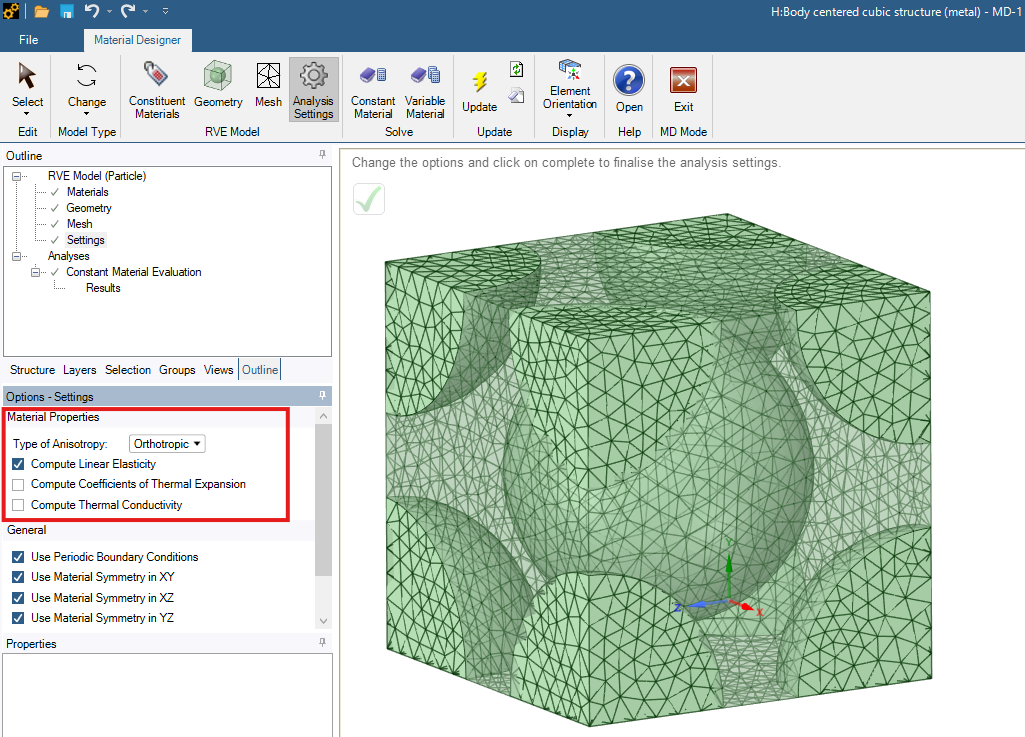
Figure 3. Settings for material property calculation.
3 Microstructure Types & Practical Examples
Material Designer includes parametric geometry generators for a broad range of microstructural patterns. The four examples below illustrate how Material Designer handles different material classes.
3.1 Unidirectional (UD) Composites (Wood Analogue)
Unidirectional composites consist of continuous parallel fibres embedded inside a resin matrix. This highly directional microstructure behaves similarly to natural wood grain, providing high stiffness along the fibre direction (X-axis) and lower transverse stiffness.
- Key Parameters: Hexagonal or square fibre packing, Fiber Volume Fraction, and Fiber Diameter.
- Homogenization: Finite element RVE analysis with conformal meshing and non-periodic or periodic symmetry boundary conditions.
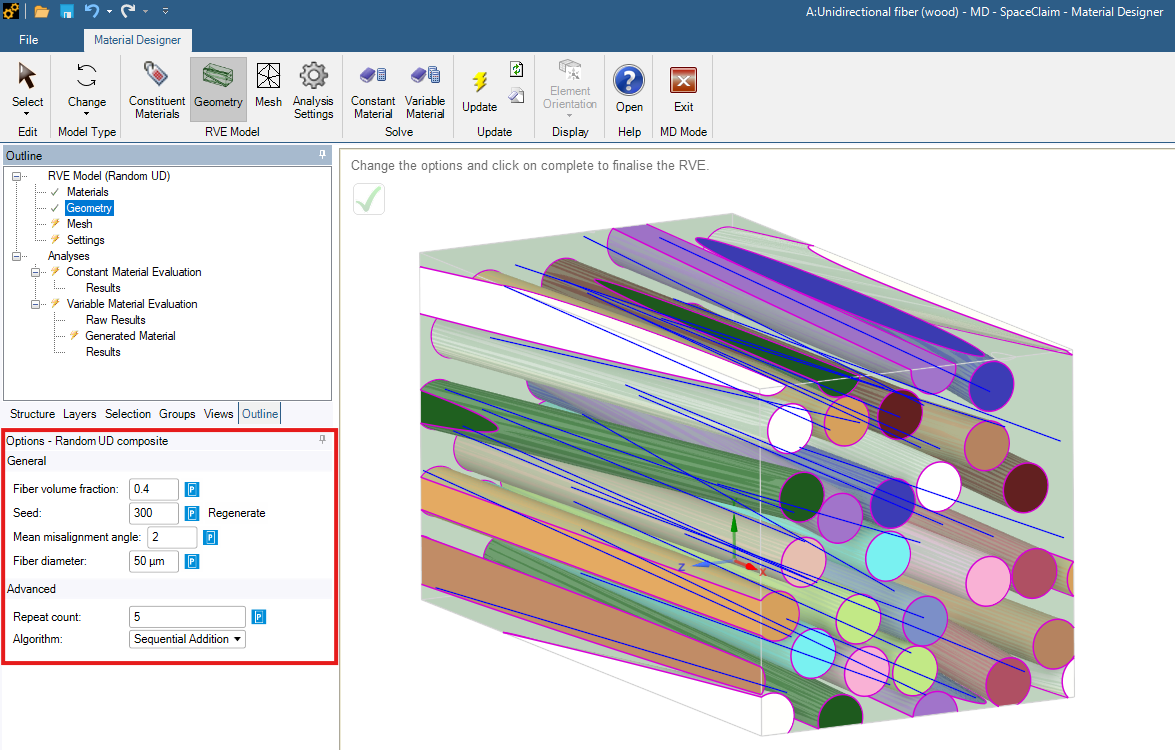
Figure 4. Wood geometry.
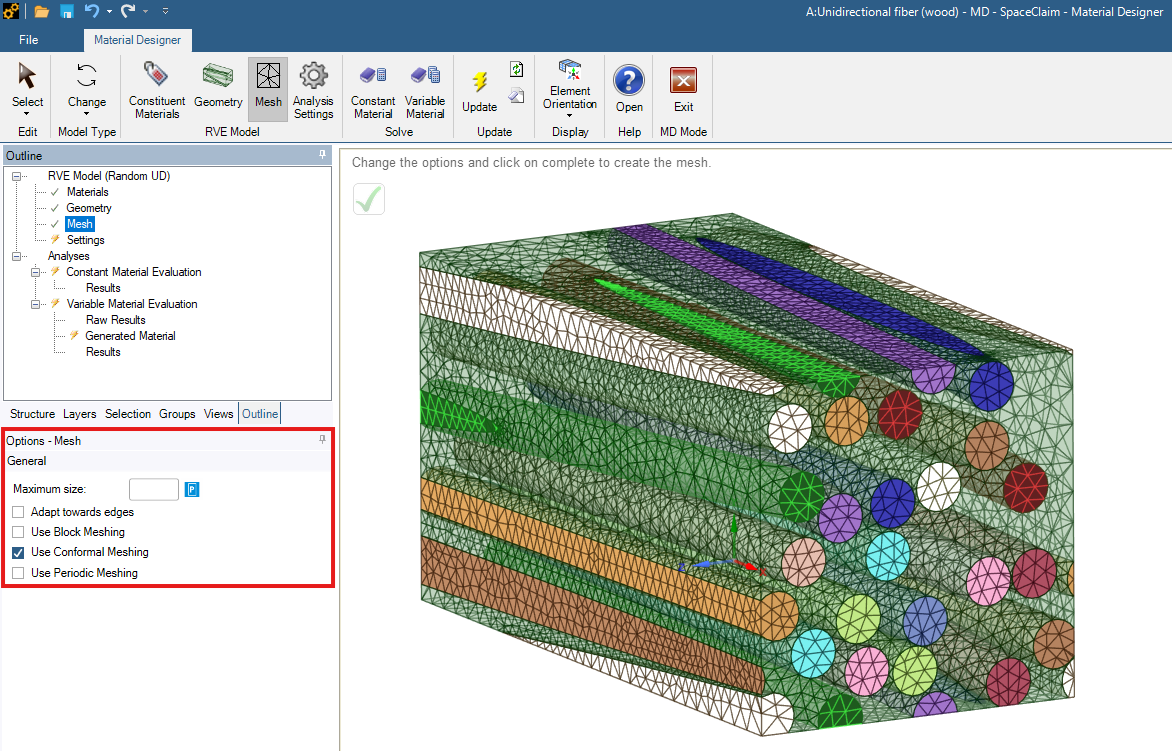
Figure 5. Wood mesh.
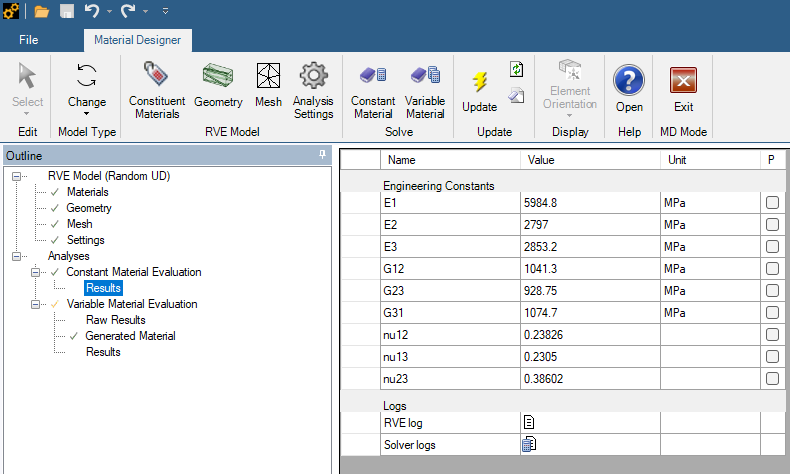
Figure 6. Wood results.
As expected, the above example reveals strong directional anisotropy. The longitudinal Young’s modulus is more than 112% higher than the transverse moduli. This pronounced stiffness gain along the X-axis occurs because the high-modulus fibres carry load directly in series along their length. In contrast, transverse loading acts in parallel across alternating fibre-matrix interfaces, where total deformation is dominated by the softer matrix phase. The slight difference between E2 and E3 is due to the random spatial distribution seed of the fibres.
3.2 Body-Centered Cubic (BCC) Lattice (Metal Additive Manufacturing)
Cellular lattices are widely used in additive manufacturing to produce high-strength, lightweight metal parts. A Body-Centered Cubic (BCC) structure represents a classic metallic lattice cell consisting of interconnected cylindrical struts.
- Key Parameters: Strut diameter, cell size, volume fraction, and optional connecting spheres or fillet rounds.
- Applications: Lightweight aerospace components, energy-absorbing crash structures, and biomedical implants.
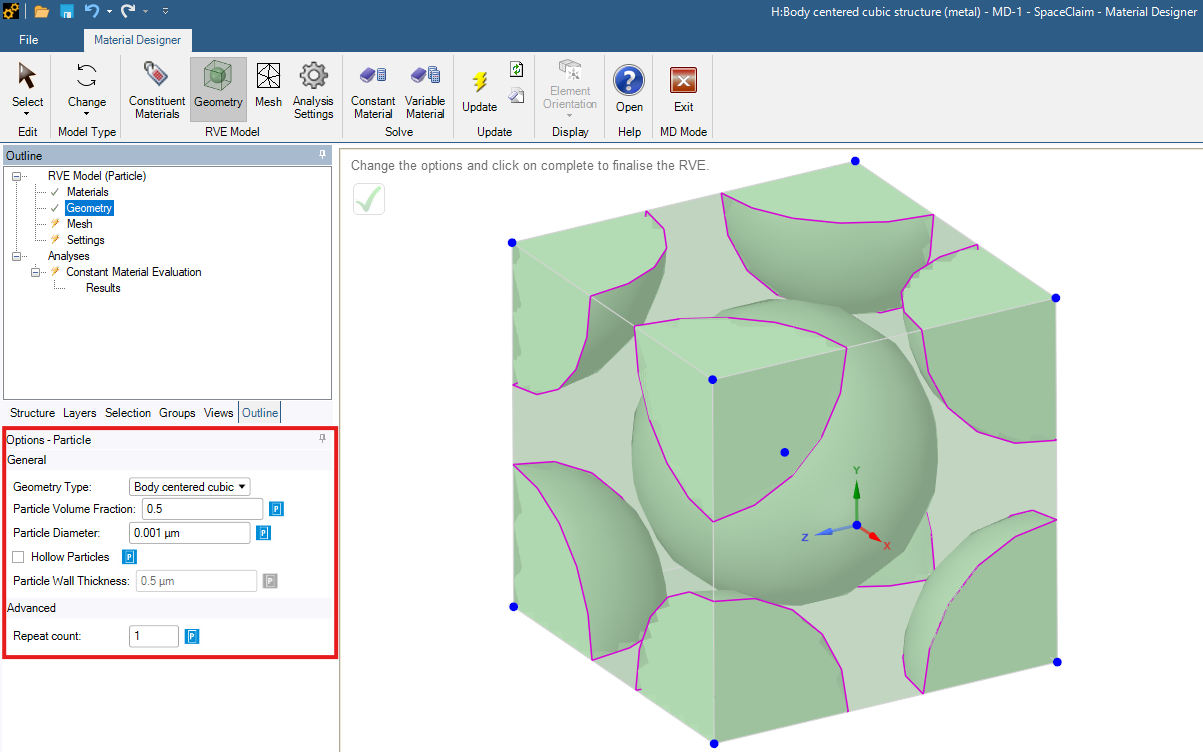
Figure 7. Metal geometry.
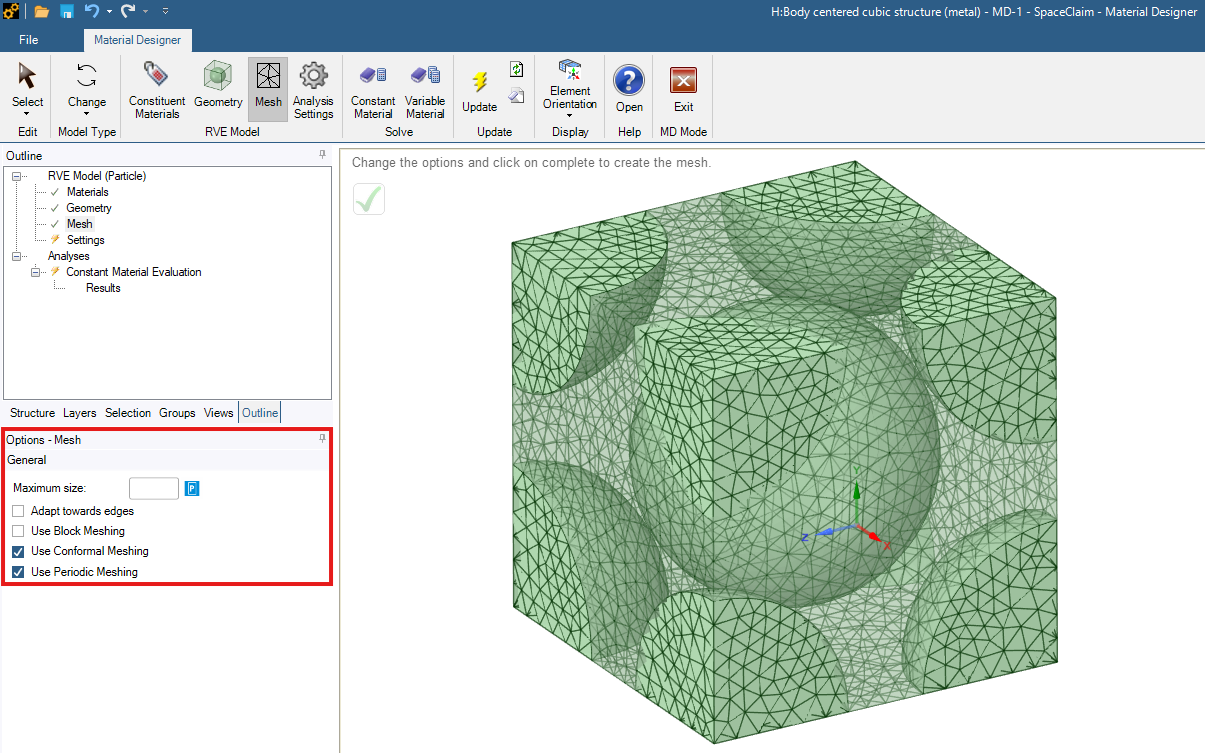
Figure 8. Metal mesh.
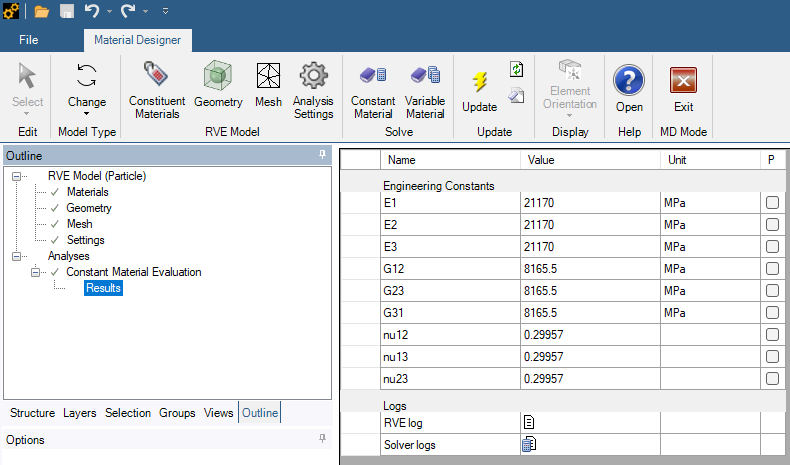
Figure 9. Metal results.
In the above example, unlike the UD fibre composite, the BCC particle microstructure produces completely isotropic macroscopic behaviour. This complete multi-directional symmetry occurs because the BCC cubic point-group symmetry arranges corner and body-centered inclusions identically relative to all three principal orthogonal axes. Consequently, virtual load states along X, Y, or Z encounter identical internal stress pathways, making BCC microstructures ideal for modelling isotropic metals like structural steel, aluminium alloys, and gold.
3.3 Lattice & Advanced Meta-Materials (Diamond Structure)
For advanced meta-material design, Material Designer supports complex topologies such as Diamond lattices and Triply Periodic Minimal Surfaces (TPMS) including Gyroid and Schwarz P geometries.
- Key Advantages: High surface-area-to-volume ratio, tailorable directional stiffness, and superior thermal management capabilities.
- Customization: Allows defining custom truss coordinates via User-Defined Lattices or importing/exporting definitions via .csv files.
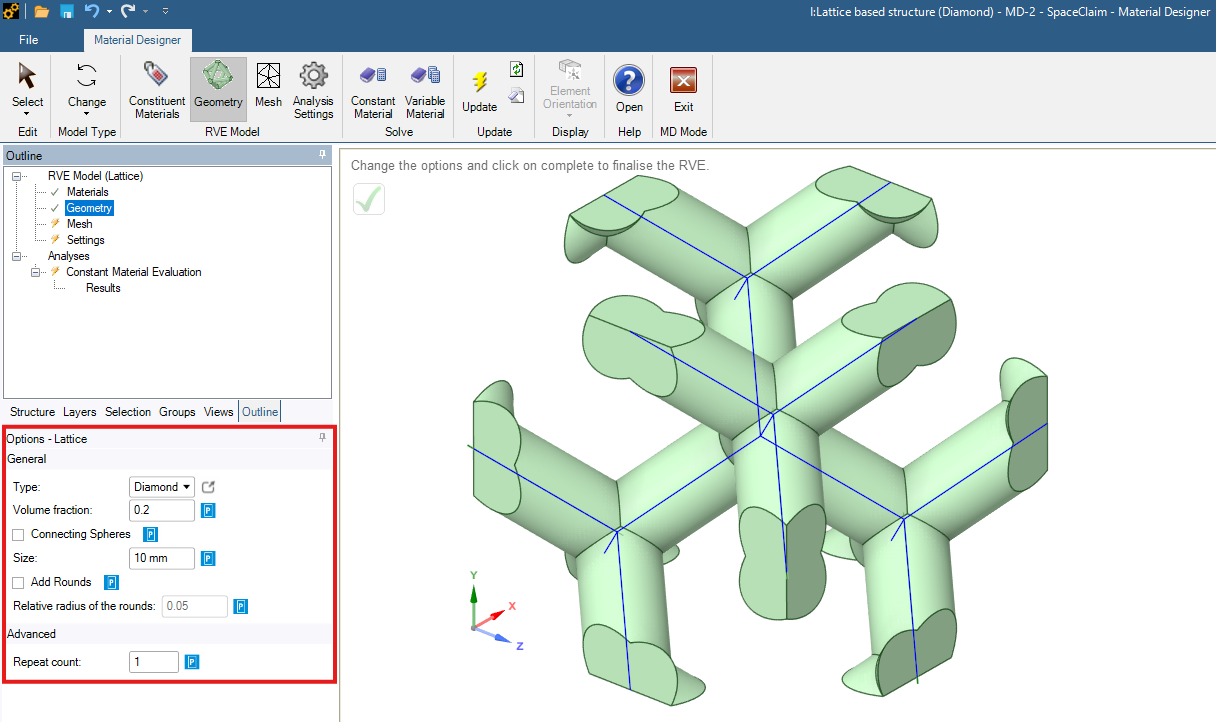
Figure 10. Diamond geometry.
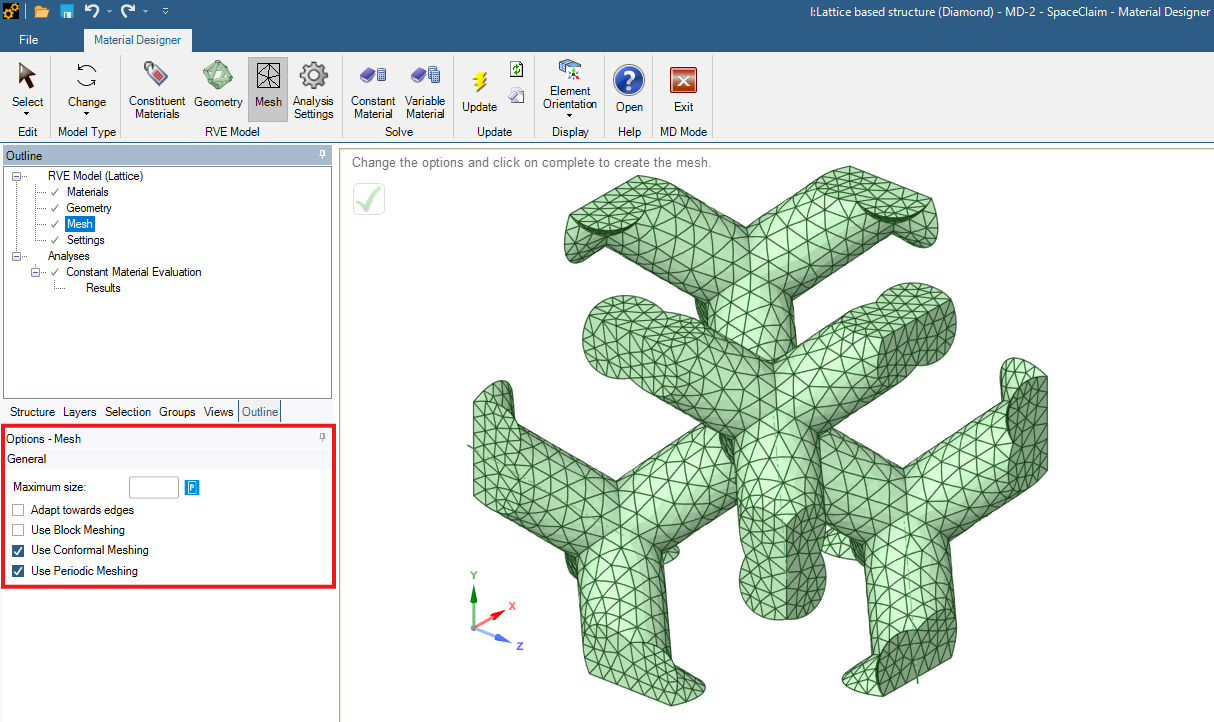
Figure 11. Diamond mesh.
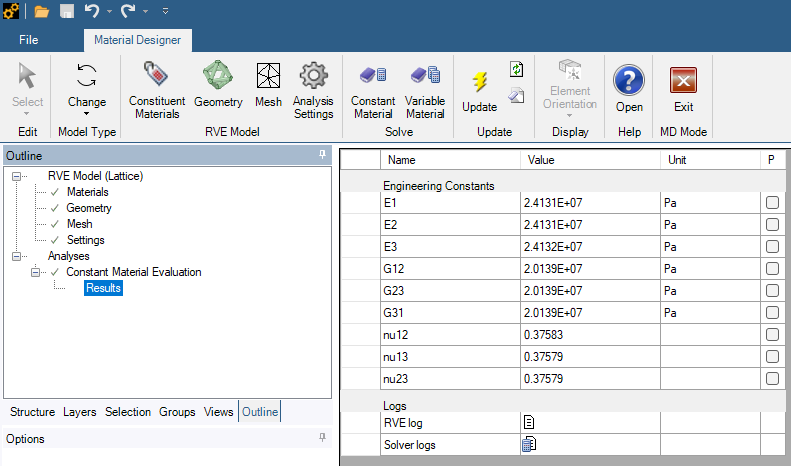
Figure 12. Diamond results.
The above example is very interesting. The tetrahedral 3D arrangement of the diamond struts distributes axial and bending forces evenly in space, resulting in virtually identical effective moduli. The constituent strut material features a Young’s modulus of 100MPa and a Poisson’s ratio of 0.3. However, the homogenized Young’s modulus is roughly 76% lower than the constituent material. This drop in effective stiffness directly reflects the high void fraction of the open lattice, showing how cell architecture allows engineers to tailor lightweight structures with specific compliance and energy absorption characteristics.
3.4 Woven Composites (Cloth & Textile Fabric Structures)
Woven textile fabrics feature a two-scale hierarchical structure where fibre yarns are woven together and surrounded by a matrix. Material Designer models woven composites using a two-level multi-scale workflow:
- Microscale System (Yarn Level): Computes homogenized orthotropic properties for the fibre yarn (fibres + matrix).
- Mesoscale System (Fabric Level): Uses the calculated yarn properties to model plain, twill, or satin weave fabric architectures.
- Draping & Shear Effects: Accounts for shear deformation (fabric fibre angle changes) during manufacturing draping over curved molds.
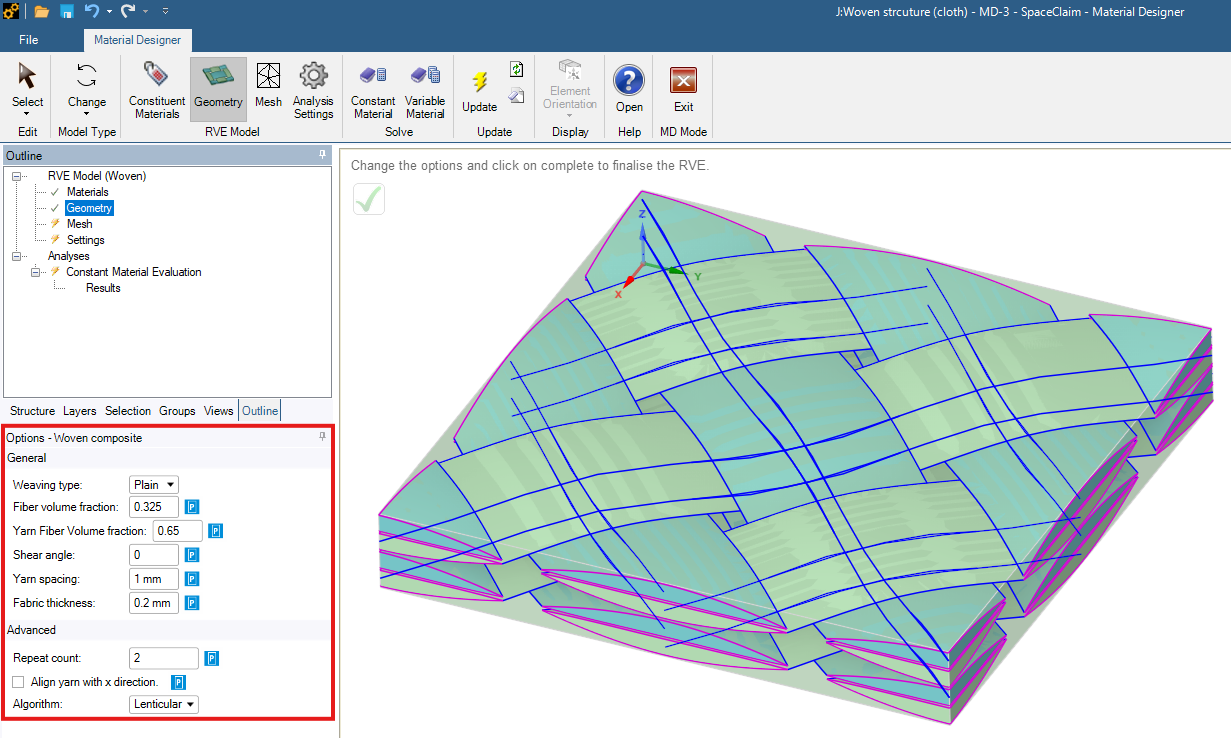
Figure 13. Cloth geometry.
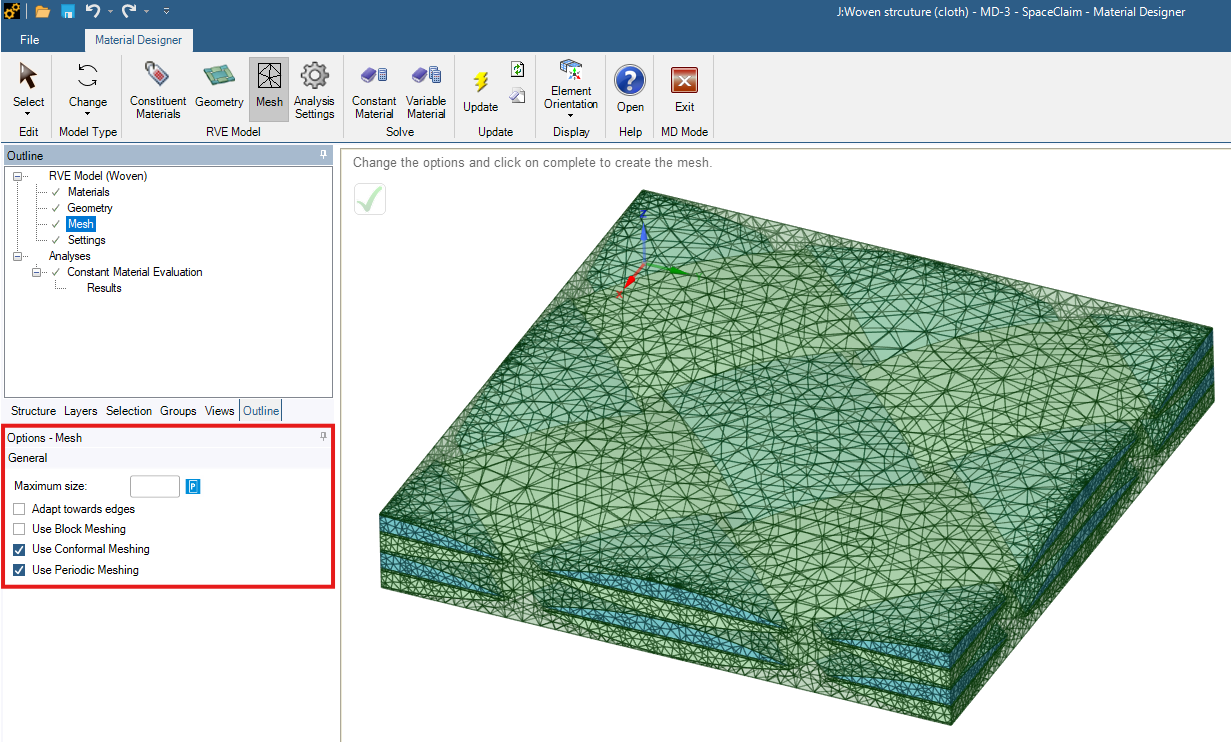
Figure 14. Cloth mesh.
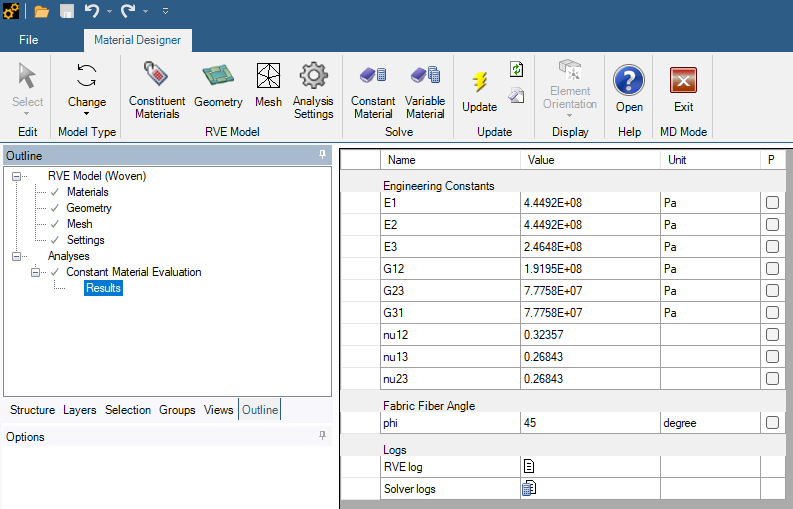
Figure 15. Cloth results.
From the woven fabric results, E1 and E2 are identical because warp and weft yarns contain equal reinforcement along the X and Y axes. The thickness-direction modulus is over 43% lower than the in-plane moduli. Because no fibres run continuously in the Z-direction, out-of-plane compression and tension rely primarily on the softer matrix resin.
4 Step-by-Step Simulation Workflow in Ansys Workbench
Performing a material homogenization analysis in Material Designer follows a straightforward workflow:
- Define Base Constituent Materials: In Workbench Engineering Data, specify elastic properties for the matrix (e.g., Epoxy) and reinforcement phases (e.g., Carbon fibres or Steel).
- Select Model Type & Configure RVE Geometry: Launch Material Designer in SpaceClaim. Select the RVE type (UD, Woven, Lattice, TPMS, Particle, or User-Defined, as shown in Figure 2) and set geometric parameters (e.g., fibre volume fraction, fibre diameter, etc.).
- Generate Conformal Finite Element Mesh: Apply block meshing and conformal meshing to ensure matching node alignments across periodic boundaries.
- Configure Analysis Settings & Solve: Select target anisotropy (Orthotropic or Anisotropic) and enable Linear Elasticity, Thermal Expansion, or Thermal Conductivity. Click Solve Constant Material to compute the homogenized property table.
- Parameter Sensitivity Study (Variable Material Solve): Parameterize variables such as Fiber Volume Fraction across a range (e.g., 0.2-0.7:7, which represents a sampling interval from 0.2 to 0.7 with 7 total samples).
5 Downstream Integration: Transferring Homogenized Materials to FEA
Material Designer integrates directly into downstream structural analysis within Ansys Workbench (as shown in Figure 1):
- Ansys Static Structural / Mechanical: Connect the Material Designer cell directly to downstream Engineering Data. The homogenized material card automatically transfers for full part-level stress and displacement analysis.
- Ansys Composite PrepPost (ACP): Feed homogenized yarn and ply properties directly into ACP for composite lay-up design, ply drop-offs, and failure criteria evaluation (e.g., Tsai-Wu, Puck). An example is discussed in this post.
- Direct Optimization: Link Material Designer parameters to Ansys DesignXplorer or optiSLang for multi-objective structural optimization.
6 Summary and Key Takeaways
- Replaces Experimental Testing: Material Designer predicts homogenized macro-properties virtually, significantly reducing physical testing cycles and material development costs.
- Comprehensive Microstructure Library: Supports UD composites, random fibres, woven fabrics, particles, 3D lattices, TPMS metamaterials, and user-defined RVE geometries.
- Multi-Scale System Integration: Seamlessly bridges microscopic constituent behaviour with macro-scale structural simulation in Ansys Mechanical and ACP.

